
Your Passport and BGD Data Deserve More Than a Promise
When you use an Indian visa autofill tool, you are not simply filling out an online form. You may be working with sensitive personal information, including passport details, applicant information, addresses, family information and other details associated with visa applications.
Naturally, this raises important questions.
- Does Indian Visa Autofill Pro store my BGD or passport information?
- Are my saved profiles uploaded to a central database?
- Can another user access my personal information?
- Why do my profiles disappear when I log in on another computer?
- What happens to information after processing is completed?
- Why doesn’t Indian Visa Autofill Pro automatically synchronize every profile across devices?
These are legitimate questions, and every user deserves clear answers.
At NexSoft Studio, we believe that productivity software should not require users to surrender unnecessary control over their personal information. Indian Visa Autofill Pro is designed with privacy-focused data handling, local profile storage and a deliberate approach to data retention.
Our objective is straightforward: help users complete repetitive Indian visa application tasks while minimizing unnecessary collection and retention of personal information.
This guide explains our security principles, how profile storage works, what local processing means for users, and why our approach differs from a system that automatically collects every user’s profiles in a central database.
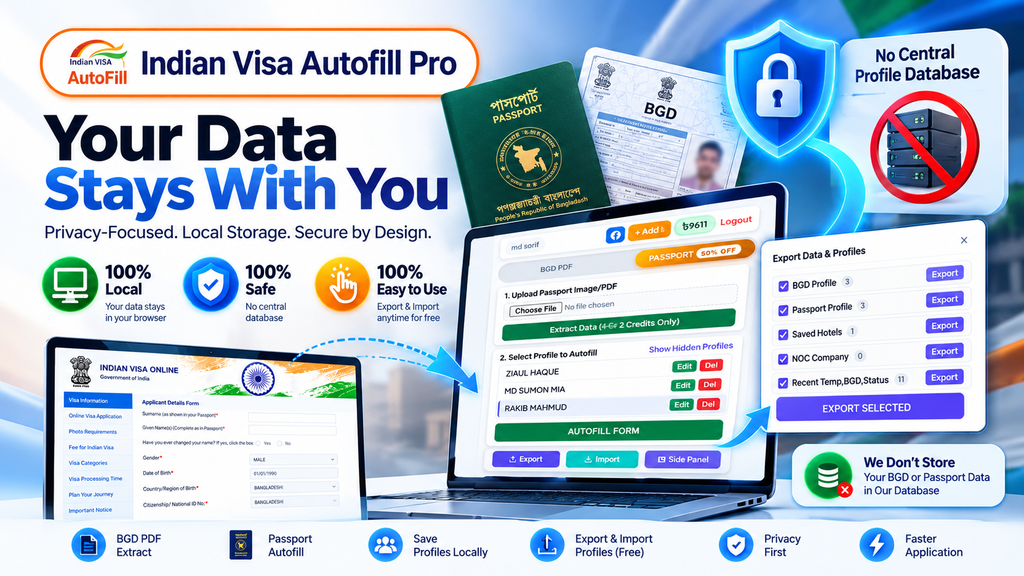
1. The Core Principle: We Do Not Maintain a Central Database of Saved User Profiles
One of the most important parts of Indian Visa Autofill Pro’s privacy approach is its treatment of saved profiles.
Indian Visa Autofill Pro does not maintain a central user-profile database for automatically synchronizing users’ saved profiles across devices.
Instead, saved profile information is maintained in the user’s browser’s local storage.
This distinction matters because storing thousands of users’ personal profiles in one central database creates a different category of security responsibility.
Imagine a system that centrally retains thousands of passport profiles, addresses, contact details and other personal information. If an attacker gains unauthorized access to that database, a large volume of information could potentially be exposed in a single incident.
Reducing unnecessary central storage reduces the amount of saved profile information concentrated in one place.
Our approach prioritizes keeping saved profiles under the user’s local browser environment rather than automatically collecting them into a shared central profile repository.
This is a deliberate privacy design decision, not simply a missing synchronization feature.
Why does this matter?
- There is no central saved-profile repository used to synchronize every user’s profiles automatically.
- Users retain their locally saved profiles in the browser where those profiles were created or imported.
- Logging in on another computer does not automatically retrieve profiles from a central user-profile database.
- Users can explicitly export supported profile data when they need to transfer it.
This architecture reduces one important category of risk: unauthorized access to a centralized collection of saved user profiles.
It does not, by itself, eliminate every possible security risk associated with devices, browsers or information processed to provide the service.
2. Does Indian Visa Autofill Pro Store BGD or Passport Data?
This is one of the most important questions users ask.
Our system is not designed to function as a permanent repository for users’ BGD documents, passport documents or saved applicant profiles.
The original BGD PDF is processed on the user’s device during the document-reading stage. The document itself is not intended to become a permanently stored file in our infrastructure.
Passport-related functionality follows the processing flow required to provide the requested service. The important distinction is that processing information to perform a function is not the same as maintaining a permanent database of users’ documents.
Our system is designed around stateless processing and data minimization rather than permanent document retention.
In practical terms, this means:
- We do not maintain a central database of saved BGD and passport profiles for automatic synchronization.
- We do not operate a permanent document repository for users’ uploaded BGD and passport files.
- Information is processed for the functionality requested by the user rather than being collected to build a permanent profile archive.
- Saved profiles are maintained locally in the browser rather than being automatically synchronized through a central profile database.
We believe this distinction should be clearly understood by every user.
Processing data to provide a service and retaining that data as a permanent user database are two different things.
Our privacy approach is built around avoiding unnecessary retention, not accumulating users’ personal documents.
3. Why We Choose Data Minimization Instead of Centralized Profile Storage
Data minimization is a fundamental privacy principle: collect and retain only the information necessary for a legitimate purpose.
For productivity tools that handle sensitive application information, this principle is especially important.
A centralized profile synchronization system can be convenient, but it also introduces additional responsibilities. The service must protect the stored information, control access, manage retention, secure backups and respond appropriately to potential incidents.
A large centralized collection of personal profiles can become an attractive target for attackers.
For Indian Visa Autofill Pro, we prioritize a different approach to saved profile management.
| Security consideration | Our approach |
|---|---|
| Saved profile management | Browser-based local storage |
| Automatic cross-device profile synchronization | Not provided through a central saved-profile database |
| Permanent repository of user documents | Not part of the intended design |
| Moving profiles between computers | User-controlled export and import |
| Privacy principle | Data minimization and purpose-limited processing |
This approach helps reduce unnecessary central accumulation of personal information.
It also gives users a clear explanation of why their profiles are available in one browser but not automatically available everywhere they sign in.
4. What Does Stateless Processing Mean for Your Privacy?
The term stateless processing can sound technical, but its basic purpose is straightforward.
A stateless processing system does not rely on permanently retaining each user’s document or profile as a stored record for future requests.
Information can be processed to provide a requested function without becoming part of a permanent user-document database.
Indian Visa Autofill Pro is designed around this principle for its processing workflows.
Our goal is to avoid turning temporary processing requirements into long-term storage of sensitive personal information.
This distinction is important for users handling visa applications because a passport or applicant record may contain information that should not be retained unnecessarily.
Does processing mean permanent storage?
No. Processing and permanent retention are separate activities.
However, users should understand that information may need to be transmitted or handled as part of a requested processing operation. The fact that a system does not maintain a permanent profile database does not automatically mean that every type of information always remains on the device.
Our commitment is to minimize retention and avoid maintaining a permanent repository of users’ documents and saved profiles.
We do not disclose our internal processing architecture, proprietary implementation or infrastructure details in this public guide. Those details are not necessary for users to understand the main privacy principles governing their saved profiles.
5. Why Your Profiles Do Not Automatically Appear on Another Computer
Some users ask:
“I logged in to my Indian Visa Autofill Pro account on another computer. Why can’t I see my old profiles?”
The answer is related to local profile storage.
Your account login and your saved browser profiles are separate.
When you create a profile, the information is saved in the browser’s local storage. Logging in on another computer does not automatically transfer that browser’s saved information to the new device.
For example:
- You save 200 applicant profiles on your office computer.
- You log in to Indian Visa Autofill Pro on your home computer.
- Your account login succeeds, but the 200 locally saved profiles do not automatically appear.
- You export your supported profiles from the original computer and import them on the new computer.
This behavior is consistent with a system that avoids central synchronization of saved profiles.
It is not necessarily a sign that your account is broken.
The solution is to use the built-in Export and Import functionality.
6. Free Profile Export and Import: Transfer Your Data When You Need It
We understand that agencies, computer shops and travel professionals may work across multiple computers.
They may need to move profiles when replacing a computer, changing workstations or organizing their application workflow.
That is why Indian Visa Autofill Pro includes a profile Export and Import feature.
Profile transfer is available free of charge.
You can export supported profile data into a backup file and import that file into another supported browser environment.
Depending on the available data, the export interface supports categories such as:
- BGD Profile
- Passport Profile
- Saved Hotels
- NOC Company
- Recent temporary, BGD and status-related data
The categories available for export depend on the data supported by your installed version.
How to export your profiles
Step 1: Open Indian Visa Autofill Pro in the browser containing your saved profiles.
Step 2: Click the Export button.
Step 3: In the Export Data & Profiles panel, select the categories you want to transfer.
Step 4: Select the available categories you need, then click Export Selected.
Step 5: Save the generated backup file in a secure location.
How to import your profiles
Step 1: Open Indian Visa Autofill Pro in the destination browser.
Step 2: Click Import.
Step 3: Select the backup file you previously exported.
Step 4: Follow the on-screen instructions to complete the import.
Step 5: Verify that the expected profiles are available before removing the original copies.
Whether you need to transfer 100 profiles, 1,000 profiles or a larger collection, the export and import workflow is intended to make profile migration easier without requiring manual recreation of every record. Actual transfer capacity depends on the amount of data and the resources available in the browser.
There is no additional profile-transfer fee.
Keep your backup files secure
An exported file may contain sensitive personal information. Treat it as confidential.
Store it in a location you control, avoid sharing it unnecessarily, and remove copies you no longer need. Anyone who gains access to an unprotected backup file may be able to access the information it contains.
Local profile storage and user-controlled export give users more control over data movement, but that control must be accompanied by responsible handling of backup files.
7. Can a Hacker Steal Every User’s Saved Profile From Our Database?
This question gets to the heart of our design philosophy.
Indian Visa Autofill Pro does not maintain a central database containing every user’s saved profiles for automatic synchronization.
Consequently, there is no such central saved-profile repository from which an attacker could retrieve the entire collection of locally saved profiles through a single database breach.
This reduces the risk associated with concentrating a large collection of saved profiles in one location.
However, it is important to distinguish this specific protection from a guarantee that no information could ever be exposed under any circumstances.
Security risks can also arise from compromised user devices, unauthorized browser access, malicious software, vulnerabilities in application code, compromised accounts or other parts of a software system.
A responsible security statement should identify what a design prevents or reduces rather than promise that every conceivable attack is impossible.
Our objective is to reduce unnecessary data exposure by avoiding permanent central storage of saved user profiles.
8. Why We Do Not Claim That Local Storage Eliminates Every Risk
Privacy claims should be based on how a system actually works.
Local storage can reduce the amount of saved profile data held centrally, but it is not the same as making data invulnerable.
For example, if someone gains access to a user’s unlocked computer or browser profile, locally saved information could be exposed.
Likewise, an exported backup file may be accessed by someone who obtains an unprotected copy.
This is why our approach combines local profile storage with the broader principles of data minimization and limited retention.
We believe users should understand both the benefits and the responsibilities associated with local storage.
Our position is simple:
- Avoid unnecessary central storage of saved profiles.
- Do not build a permanent repository of users’ BGD and passport documents.
- Keep saved profile information in the user’s browser.
- Provide an explicit export and import method when users need to move their data.
- Explain the limitations of local storage honestly.
These principles provide a more meaningful explanation of privacy than an unsupported promise of absolute security.
9. Do We Sell or Maintain a Collection of Users’ Personal Documents?
Indian Visa Autofill Pro is designed to provide productivity functionality, not to operate a permanent repository of users’ BGD and passport documents.
We do not maintain a central database of saved user profiles for automatic synchronization, and we do not operate a permanent document archive as part of the intended design.
Our privacy approach is to process information for the requested service while avoiding unnecessary collection and retention.
Users should always review the product’s applicable privacy policy for the full details of data handling, including any information required for authentication, service delivery, billing, diagnostics or other disclosed operational purposes.
The absence of a central saved-profile database should not be interpreted as a blanket statement that no operational information is ever processed anywhere in the service.
We believe clear distinctions help users make informed decisions about the tools they use.
10. Privacy-Focused Design for Visa Agencies and Computer Shops
Indian Visa Autofill Pro is designed for people who regularly work with Indian visa application forms, including travel agencies, visa processors, computer shops and individual applicants.
These users may work with many profiles and handle personal information throughout their daily workflow.
A privacy-focused design is therefore important for more than convenience.
For visa agencies
Local profile storage avoids automatically centralizing every saved applicant profile in a shared synchronization database.
The free export and import workflow also helps agencies migrate supported profiles between workstations.
For computer shops
Users can transfer supported profiles when changing computers or reorganizing their workstation setup, provided they have access to the original profiles or a backup file.
For individual applicants
Users can keep saved profiles within their browser and explicitly export supported data when they need to move it.
For all users
The design emphasizes data minimization, local profile management and deliberate data transfer instead of assuming that every saved record should automatically be uploaded and synchronized.
11. What Users Can Do to Protect Their Data
A privacy-focused extension is one part of a larger security picture. Users also play an important role in protecting their information.
We recommend the following practices:
Protect your computer. Use a trusted operating-system account and keep your browser updated.
Control access to your browser. Avoid leaving an unlocked computer containing sensitive profiles unattended.
Secure exported files. Keep backup files private and store them only where appropriate access controls are available.
Avoid unnecessary sharing. Do not send BGD or passport information to people or services that do not need it.
Maintain important backups. If you rely on locally stored profiles, keep a secure backup of supported data when appropriate. Local data may be lost if the browser profile is deleted, the computer fails or the local storage is otherwise removed.
Verify transfers. After importing a backup, confirm that your profiles are present before deleting the original copy.
These steps complement the product’s local-storage approach and help users manage their own privacy more responsibly.
12. Frequently Asked Questions About Indian Visa Autofill Pro Security
Does Indian Visa Autofill Pro store my saved profiles in a central database?
No. Saved profiles are maintained in the browser’s local storage rather than in a central user-profile database used for automatic synchronization.
Does my BGD PDF become a permanently stored document on your infrastructure?
The BGD PDF is parsed on the user’s device, and the original PDF is not intended to become a permanently stored document on our infrastructure.
How is passport information handled?
Passport-related information is handled as required for the requested functionality. The system is designed to avoid maintaining a permanent repository of users’ passport documents or saved profiles.
Why are my profiles missing when I log in elsewhere?
Your saved profiles are stored in the original browser’s local storage. Logging in on another computer does not automatically transfer that information. Use Export and Import to move supported profiles.
Is the Export and Import feature free?
Yes. There is no additional fee for transferring supported profile data through the Export and Import feature.
Can I transfer thousands of profiles?
The feature is designed to support transferring large collections of profiles. The practical capacity depends on the amount of data, file size, browser resources and the version being used.
Does local storage mean that data leakage is impossible?
No system should claim that every possible form of data exposure is impossible merely because it uses local storage. Local storage reduces reliance on central profile retention, but device compromise, unauthorized access, malicious software and other vulnerabilities can still present risks.
Does Indian Visa Autofill Pro share my saved profiles with other users?
Saved profiles are maintained locally rather than through a central database for automatic profile synchronization. Users should protect their browser access and exported backup files, since anyone who obtains access to those may be able to view the information they contain.
Can NexSoft Studio recover profiles that I did not export?
If the original browser data is lost and no backup exists, those locally stored profiles may not be recoverable. We recommend exporting important supported data before changing computers or removing a browser profile.
Where can I get Indian Visa Autofill Pro?
Visit the official NexSoft Studio website at https://nexsoftstudio.com for product information, updates and available support resources.
Conclusion: Security Begins With Minimizing Unnecessary Data Retention
At NexSoft Studio, we believe productivity tools should help users complete their work without creating unnecessary collections of sensitive personal information.
Indian Visa Autofill Pro follows a privacy-focused approach to saved profile management. Rather than maintaining a central database of user profiles for automatic synchronization, it keeps saved profile information in the browser’s local storage and provides a free Export and Import feature for users who need to transfer supported data.
This approach reduces the concentration of saved profiles in a central repository and gives users a practical way to manage their information across computers.
It does not eliminate every conceivable security risk, and users should still protect their devices, browser profiles and exported files.
Our objective is to make Indian visa application work easier while treating personal information with the care it deserves.
Indian Visa Autofill Pro — designed for productivity, built around data minimization, and committed to privacy-focused profile management.
Learn more about NexSoft Studio: https://nexsoftstudio.com